|
A lot of players chooses to play on "Cool Pool" instead of the much superior "Maximum Pool". People dont
like to have the CD in. But to make it work without the CD is very easy.
Here it goes:
1. Make sure you have done the "Large install"
2. Open your regedit (click on start - run, type regedit, click OK) Go to:
HK_LOCAL_MACHINE->SOFTWARE->Dynamix->Sierra Sports Maximum Pool
Double click on "CDPath" There you change Value to where you installed your MaximumPool folder
on your computer ("C:\Sierra\MaximumPool" is the default) so it looks like the picture below.

Close regedit
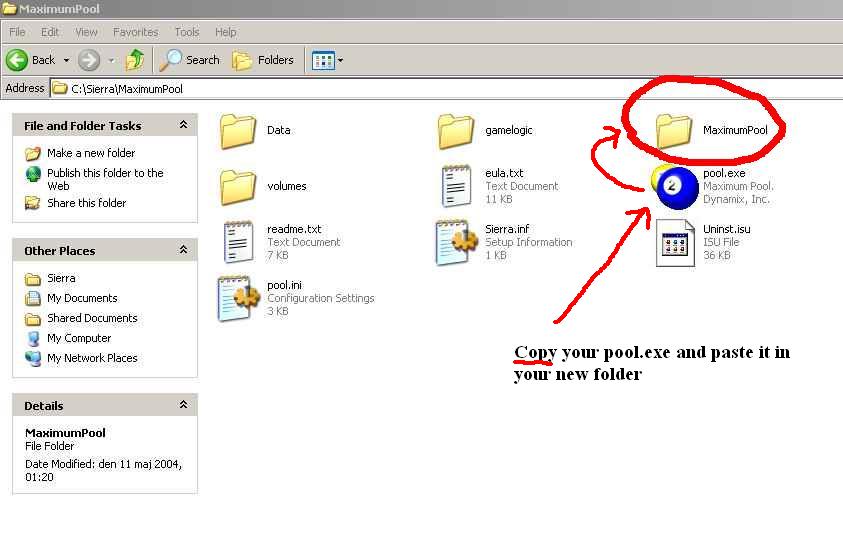
3. Go to your installed MaximumPool folder, make a new folder there and call it "MaximumPool". Look
at picture below.
4. Copy your pool.exe file and paste it in that new folder.
Take out CD and start the game as you normally do.
Now it should work.
(This works with "MaximumCueball" too, just change the name.)
PATCHES:
if you get a new n faster pc, the game might act a bit strange, spinning tables and fast right clicks. www.sierra.com have patches for both games you find links below
Maximumpool patch:
ftp://ftp2.sierra.com/pub/patches/pc/mp106.exe
Coolpool patch:
ftp://ftp1.sierra.com/pub/patches/pc/cp101us.exe
If you have a ripped Maximumpool game, the sierra patch might not work then download the zip below and extract files
to your game folder(works for MaximumCueball also):
MaxPool_ripped_game_patch
At the PAuth site you will find programs like cp-ignore - a program that saved the game from spammers.
You will also find a community interested in anti-cheat there...
www.pauth.com
|